WakeUp: Sleep Quality for iPhone & Apple Watch
Concept · iOS + watchOS · Product Strategy & UX Design
Overview
WakeUp is a sleep tracking app for iPhone and Apple Watch that tells you not just how long you slept, but how well. Built around a proprietary Sleep Quality Index (SQI), it quantifies sleep quality across all four physiological stages and surfaces the moment in your cycle when waking up will feel best. The challenge: translate complex biometric data from the Apple Watch into an experience that feels effortless at 6am.
$4B+
Global sleep tech market
2 Platforms
iPhone + Apple Watch native
4 Stages
N1, N2, N3, REM tracked
3-Pillar
Learn · Know · Act framework
The Challenge
Design Brief
Design an iPhone and Apple Watch app that helps users wake up feeling productive and positive. The product must use Apple Watch sensors to track sleep quality, surface meaningful insights without overwhelming the user, and trigger a smart alarm at the optimal moment in their sleep cycle.
The harder problem wasn't the alarm. It was defining what "optimal" means, making it measurable, and then making that measurement feel human.
User Research
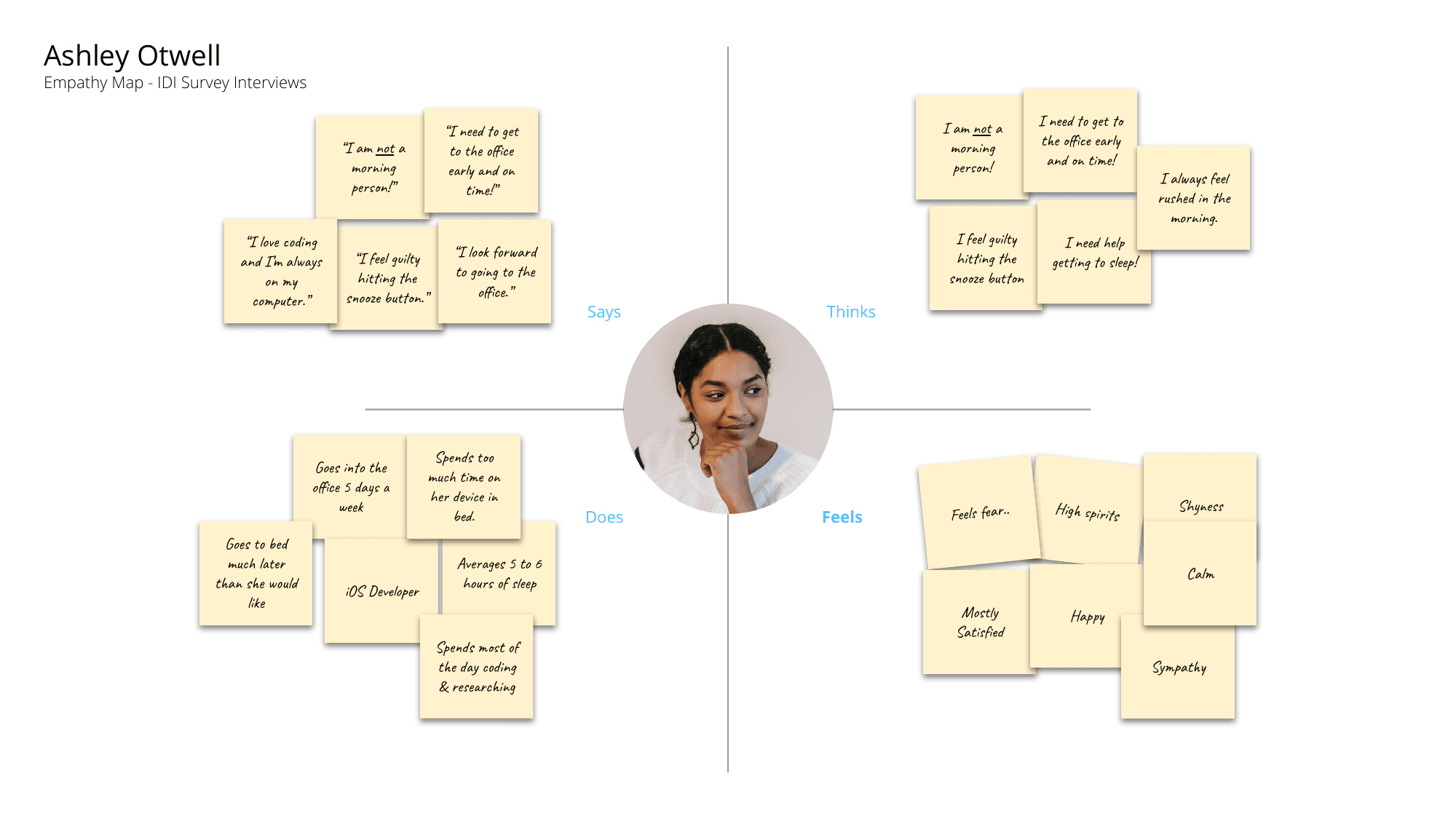
Rather than designing for an abstract user, I identified two archetypes spanning WakeUp's target audience: a knowledge worker who optimizes digitally, and a trades professional whose day starts before most alarms go off. Empathy mapping across both revealed a shared frustration: sleep apps tell you how long you slept, not whether it was any good.
| User | Context | Core Pain | Goal |
|---|---|---|---|
| Ashley Otwell 26 · Salem, OR | iOS Developer | Wakes up groggy and disoriented; phone is across the room, forcing physical interruption of a sleep cycle at the wrong moment. | Understand her sleep quality and wake up feeling like she earned the morning. |
| Benjamin Bride 33 · Truckee, CA | Business Owner, Leather Worker | Early starts for long drives mean blunt alarm interruptions. No visibility into whether he actually slept well or just logged hours in bed. | Wake up at the right moment in his sleep cycle so the first hour of the day has momentum. |
User Journey Map
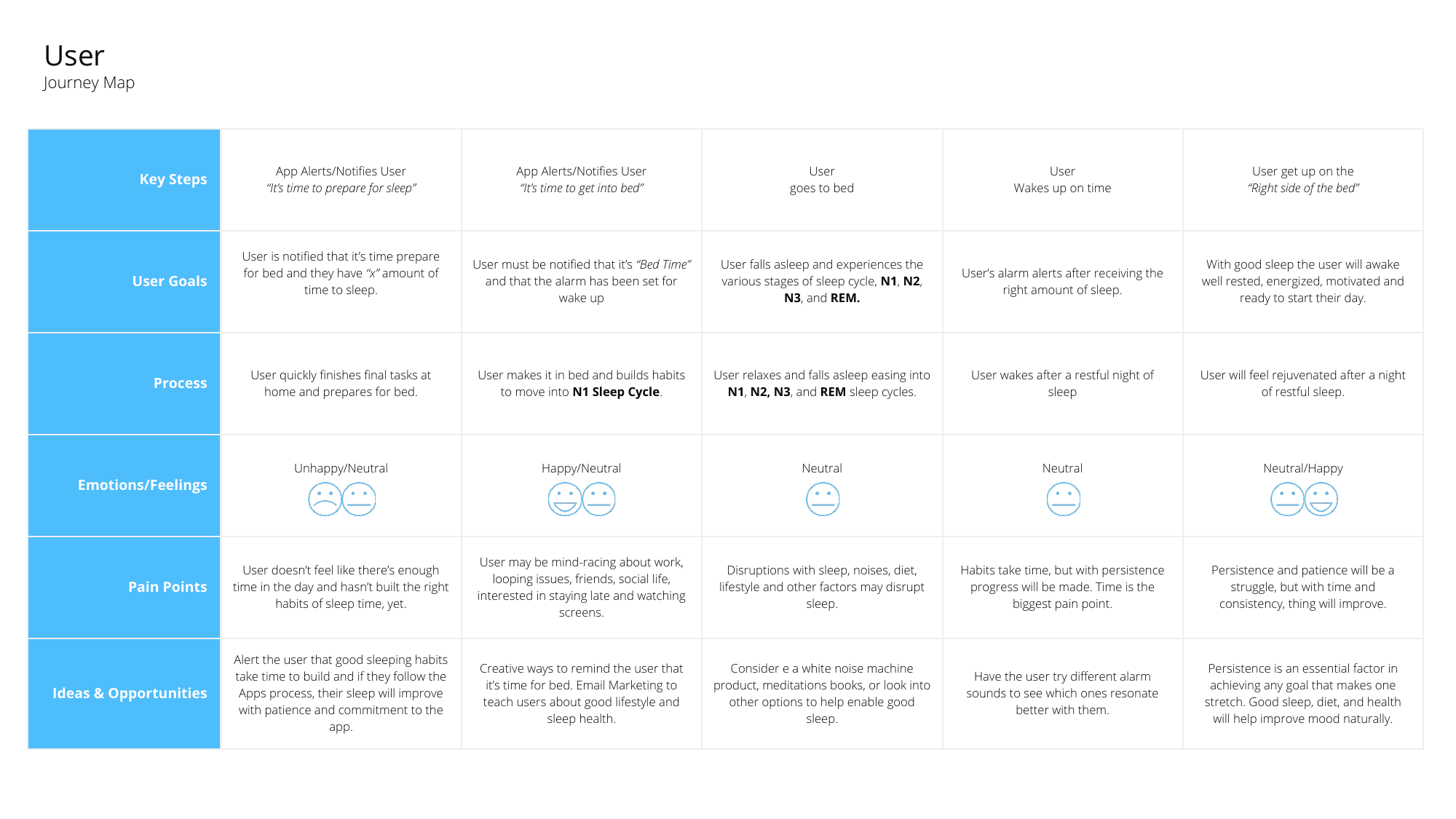
I mapped the complete experience from preparing for sleep through the morning alarm, identifying emotional highs and lows at each step. The key insight: the highest-anxiety moment wasn't waking up. It was setting the alarm the night before, when users didn't trust the app to handle it. That anxiety shaped the entire alarm setup UX.
Step 01
Prepare for Sleep
Neutral → Anxious
Users want to set the alarm and forget it. Decision fatigue is high at bedtime.
Step 02
Bedtime Notification
Prompted
App sends a "time to wind down" alert. Gentle, not alarming.
Step 03
Sleep
Trust
Watch tracks passively. No input required. Trust is earned through background behavior.
Step 04
Smart Alarm Fires
Gradual
Haptic + gentle audio. Triggers in the optimal REM window, not at a fixed time.
Step 05
Right Side of the Bed
Positive
App surfaces SQI score and sleep stage breakdown. First screen sets the tone for the day.
The Concept: Sleep Quality Index
Most sleep apps use duration as a proxy for quality. WakeUp rejects that shortcut. I designed the Sleep Quality Index (SQI) as a single, legible score for time actually asleep versus time in bed, a clean 0–100 scale users can internalize and act on. The intelligence behind it is the real product.
Sleep Quality Index Formula
SQI = (Total Sleep Time / Time In Bed) × 100
Target: SQI ≥ 85 indicates restorative sleep. SQI < 70 triggers recovery recommendations.
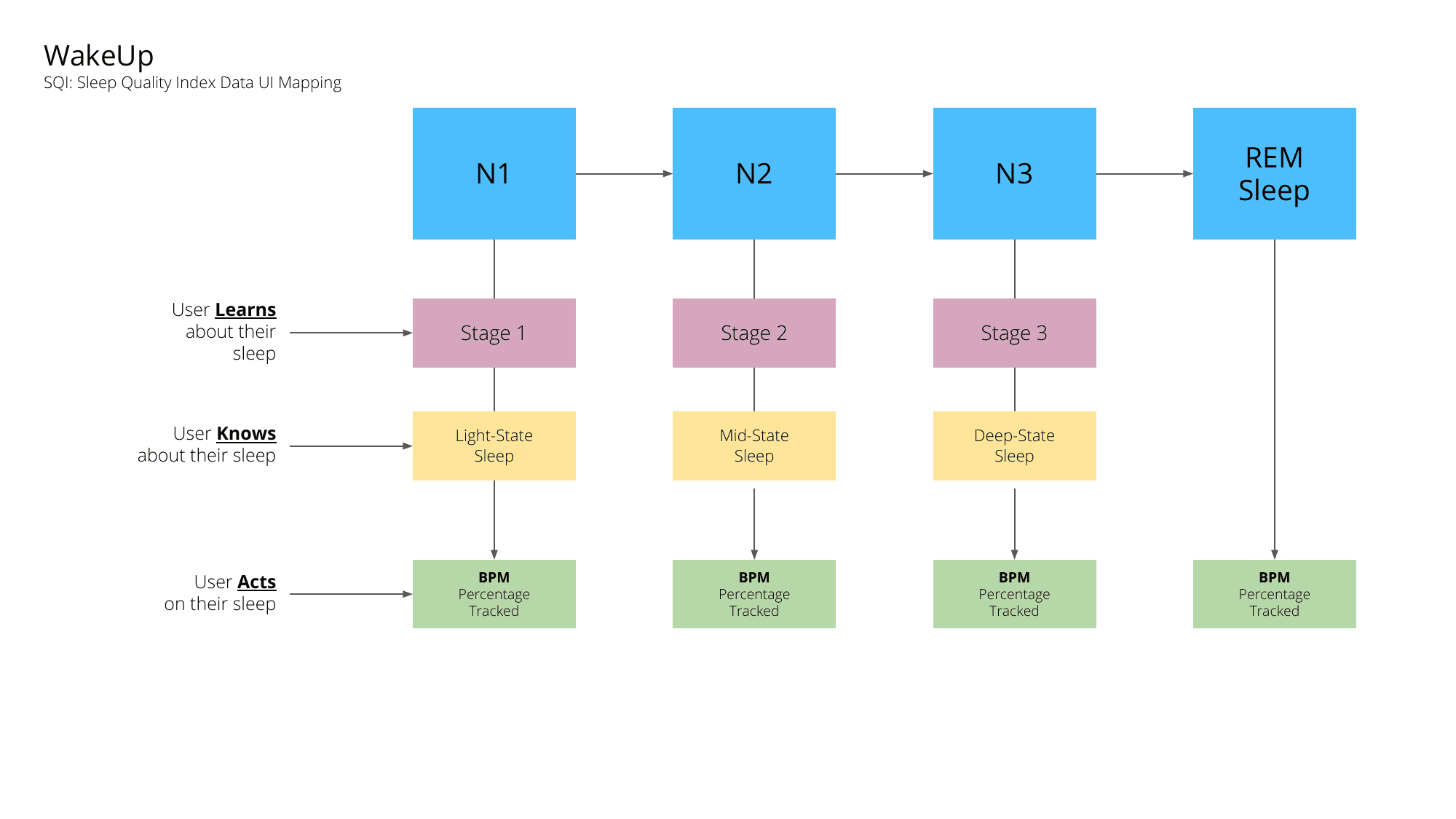
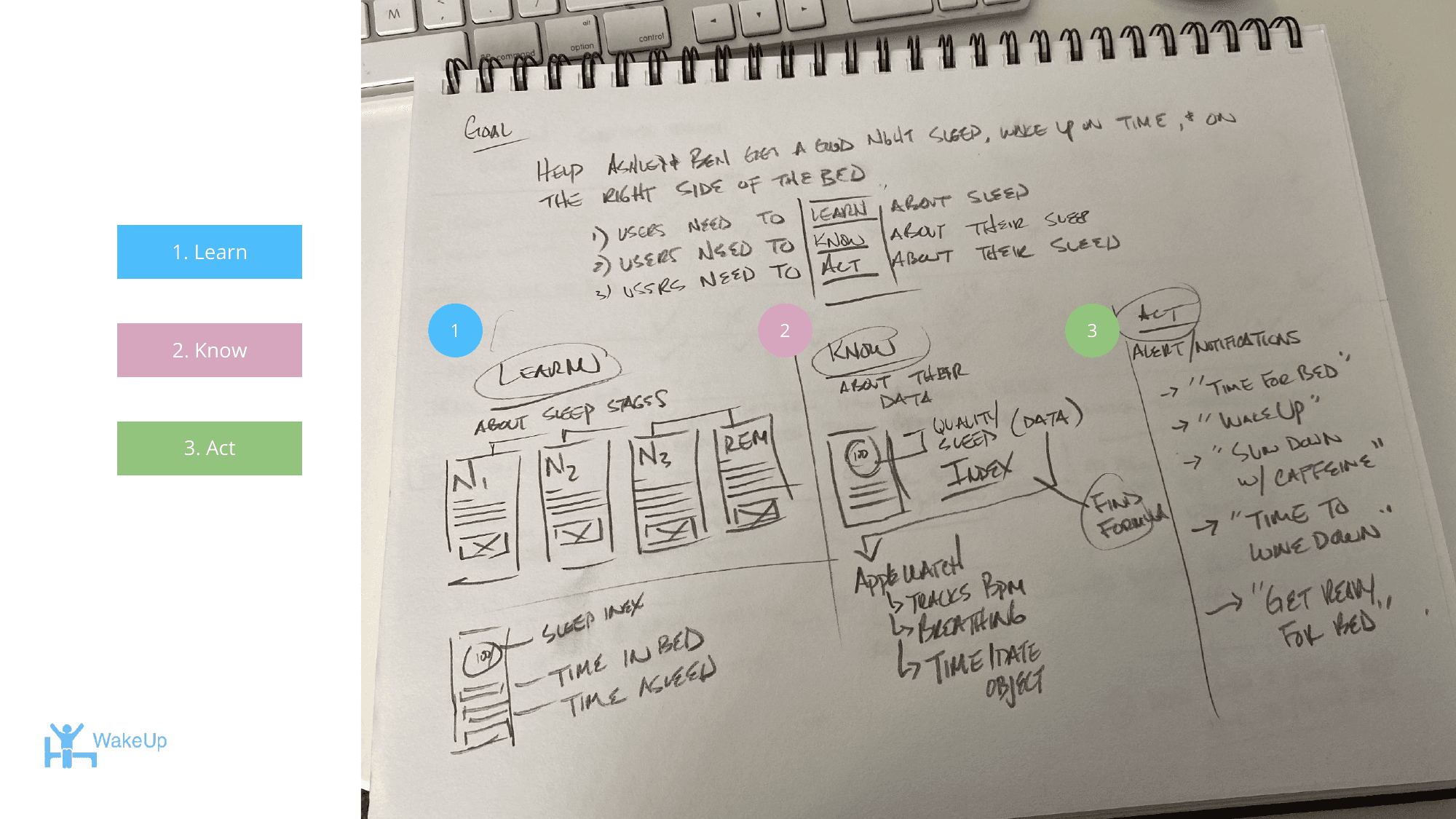
The SQI is organized around a three-pillar framework: Learn (understand what happened), Know (compare to your personal baseline), and Act (get a specific recommendation). Every screen in the app maps back to one of these three pillars.
Learn
Surface what happened during the night. Raw stage data, BPM trends, and time-in-stage breakdowns shown as readable charts, not medical dashboards.
Know
Compare last night to your personal baseline. Is your deep sleep trending down? Is your REM window shifting? Context turns data into insight.
Act
Give the user one clear next step. Not a list of tips. A prioritized recommendation tied to what the data actually shows.
Sleep Stage Intelligence
Apple Watch tracks heart rate via green LED sensors and motion via the accelerometer and gyroscope. WakeUp maps these signals to sleep stages and applies the Learn / Know / Act framework at each one, letting the smart alarm decide confidently when to wake the user.
| Stage | BPM Range | Learn | Know | Act |
|---|---|---|---|---|
| N1 Light Sleep | 50–60 BPM | Orient, display entry into sleep | Time to reach N1 vs. baseline | Gentle haptic check-in |
| N2 Mid Sleep | 45–55 BPM | Stabilize, begin tracking rhythm | N2 duration vs. prior nights | No interruption; monitor |
| N3 Deep Sleep | 40–50 BPM | Restore, track recovery quality | Deep sleep % of total sleep | Protect; no alarm window here |
| REM REM Sleep | 50–65 BPM | Consolidate, memory and processing | REM cycles logged vs. target | Smart alarm trigger window opens |
Ideation
Early ideation focused on the core hypothesis: people wake up feeling bad not because they slept too little, but because they were interrupted at the wrong moment in their cycle. Sketching the alarm flow first showed the smart alarm needed a user-defined window, not a fixed time: a user who needs to be at work by 7am sets a window of 5:30–6:15, and WakeUp decides within it. That single constraint shaped the entire alarm UX.
Design Process
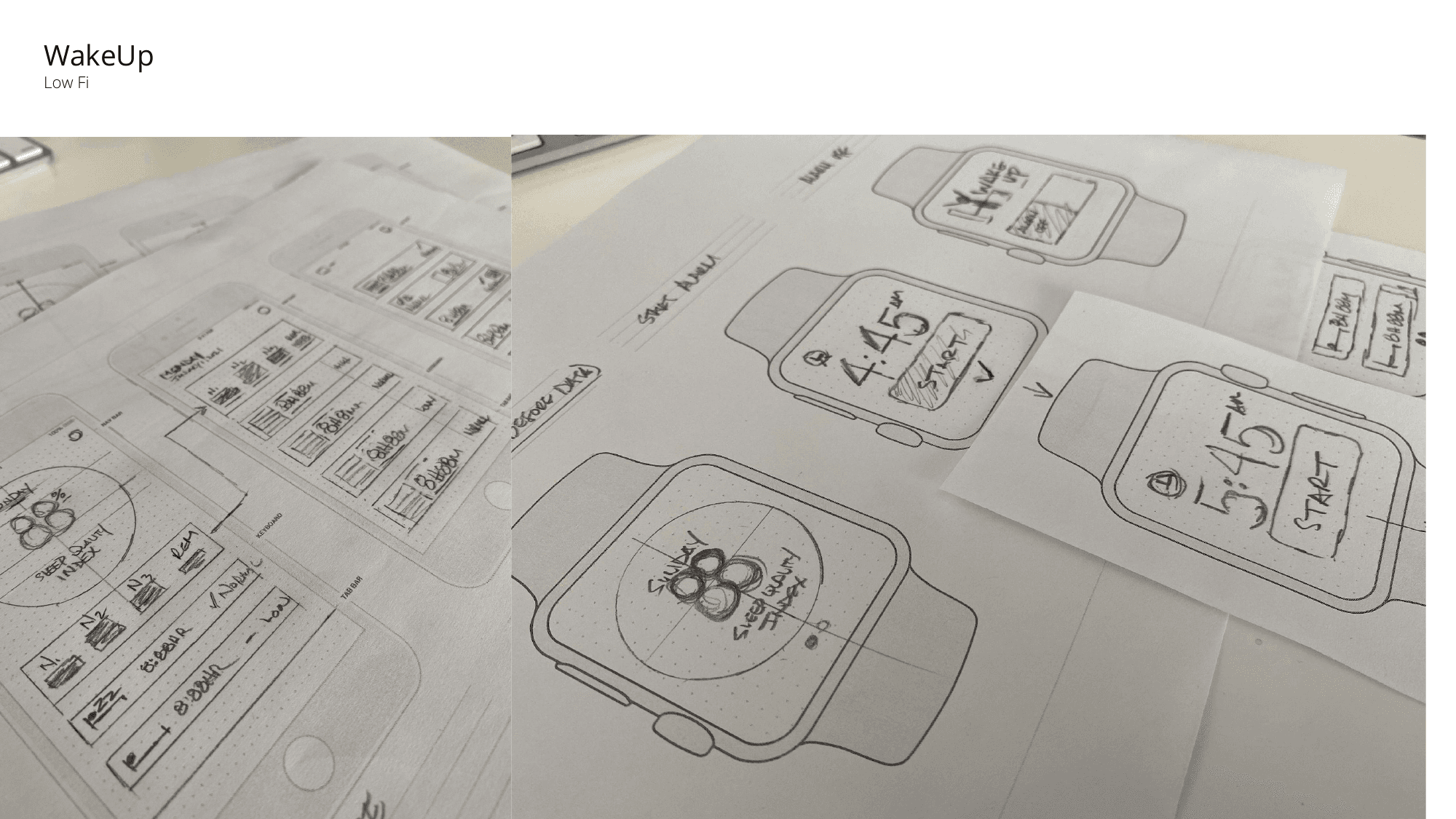
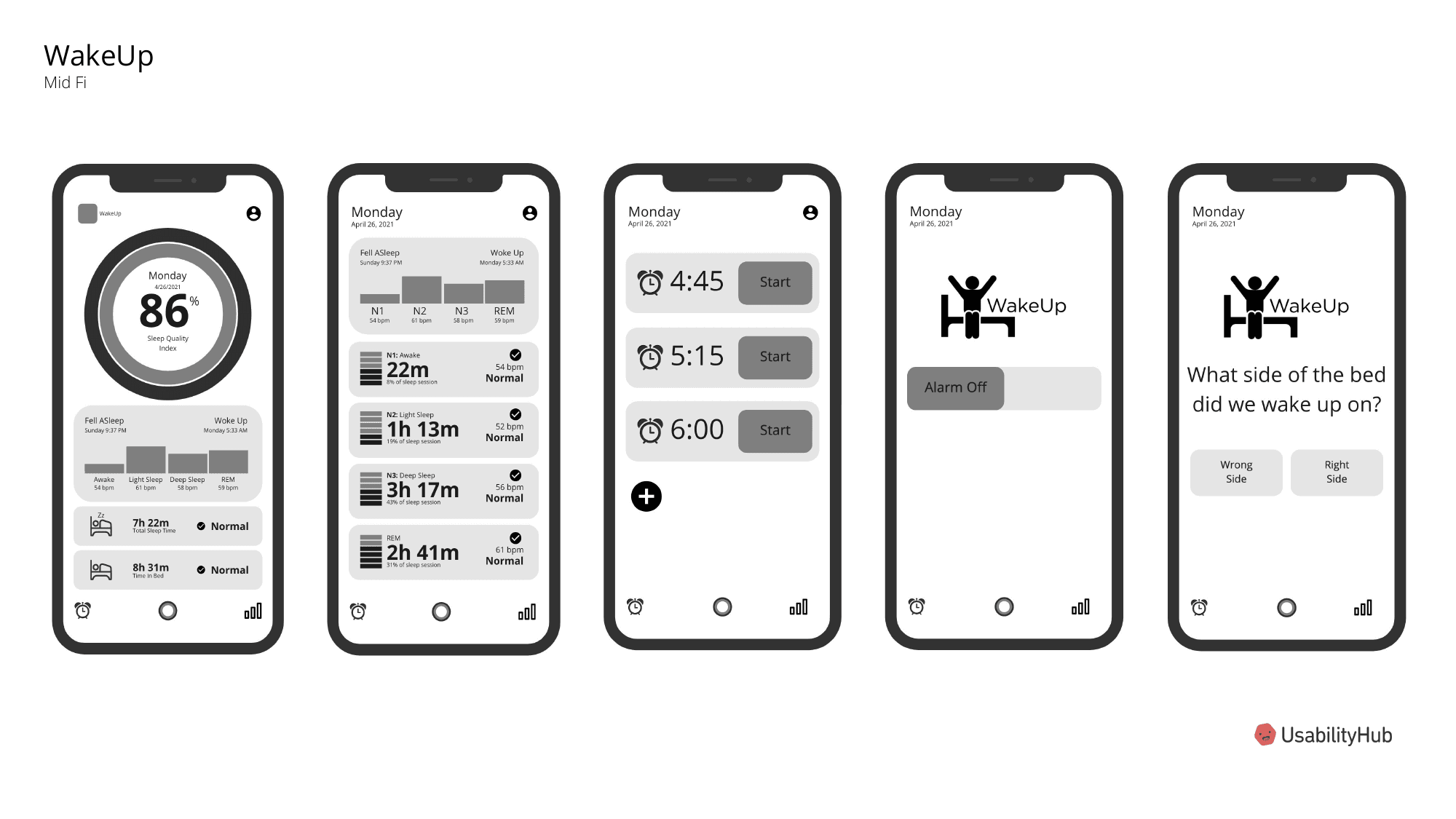
The process moved from low-fi paper sketches through mid-fi wireframes tested on UsabilityHub, into high-fidelity designs. Because WakeUp spans two form factors, every screen required two design passes: glanceable information at 44mm demands different hierarchy decisions than a 6.1" iPhone screen, so most mid-fi iteration focused on the Watch interface.
Hi-Fidelity Design
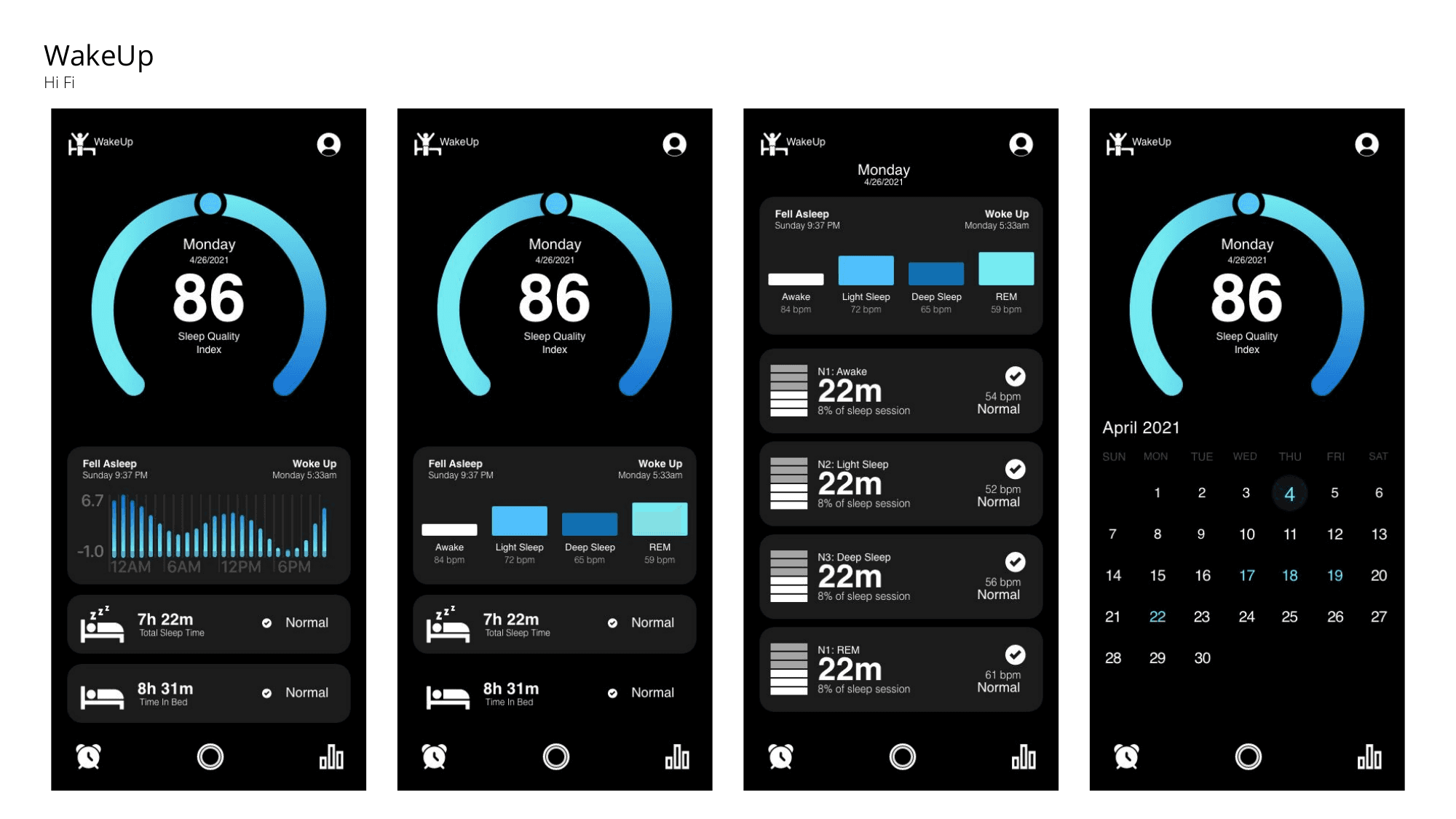
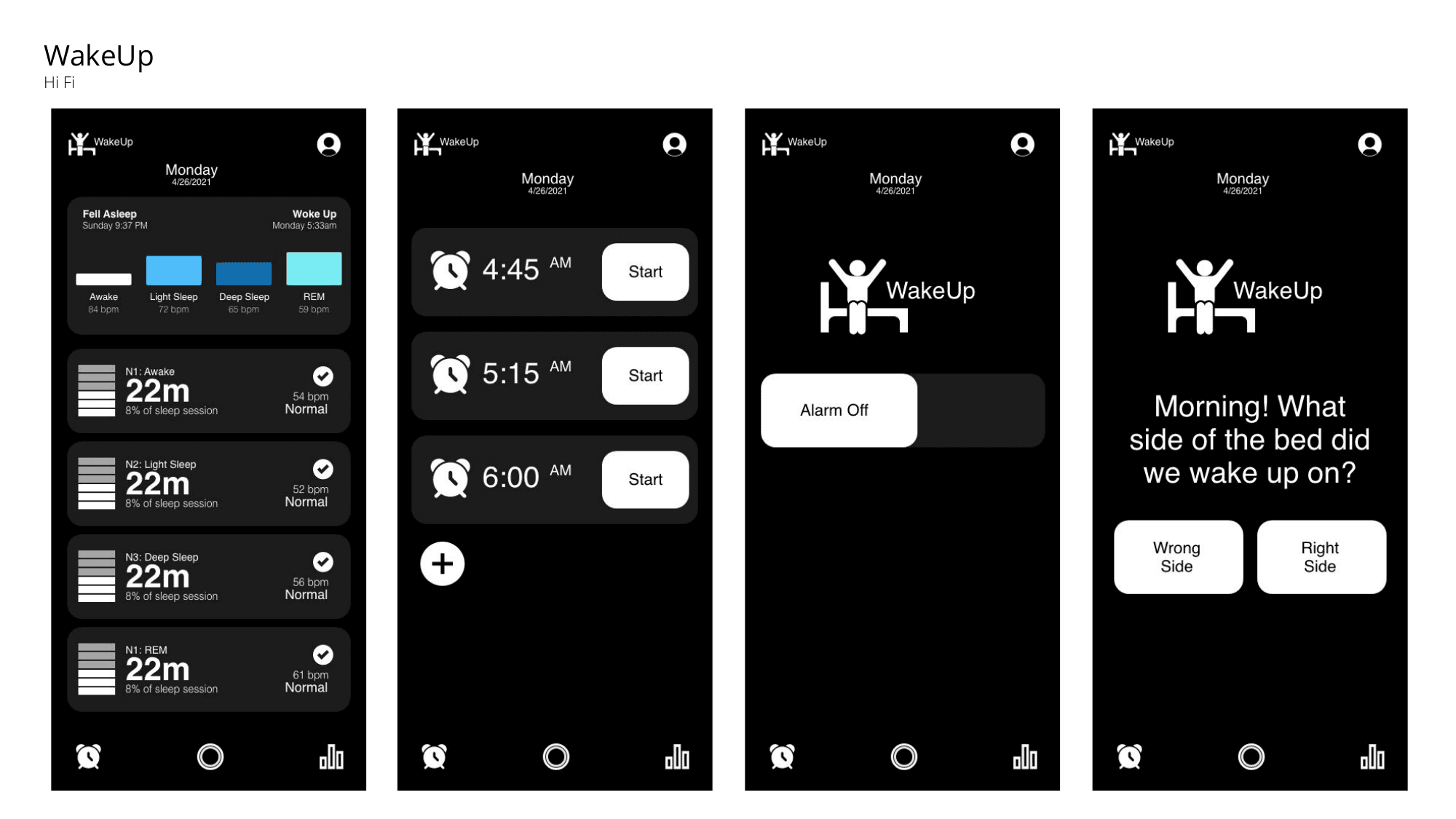
The visual language is deliberately dark and calm: sleep is a nighttime context, and a white interface at 11pm is hostile. The dark theme extends to the Apple Watch, where black OLED pixels consume zero battery, a technical constraint that reinforced the design direction. The SQI gauge at the top of the dashboard is the first thing a user sees in the morning.
Feature 01
Sleep Quality Dashboard
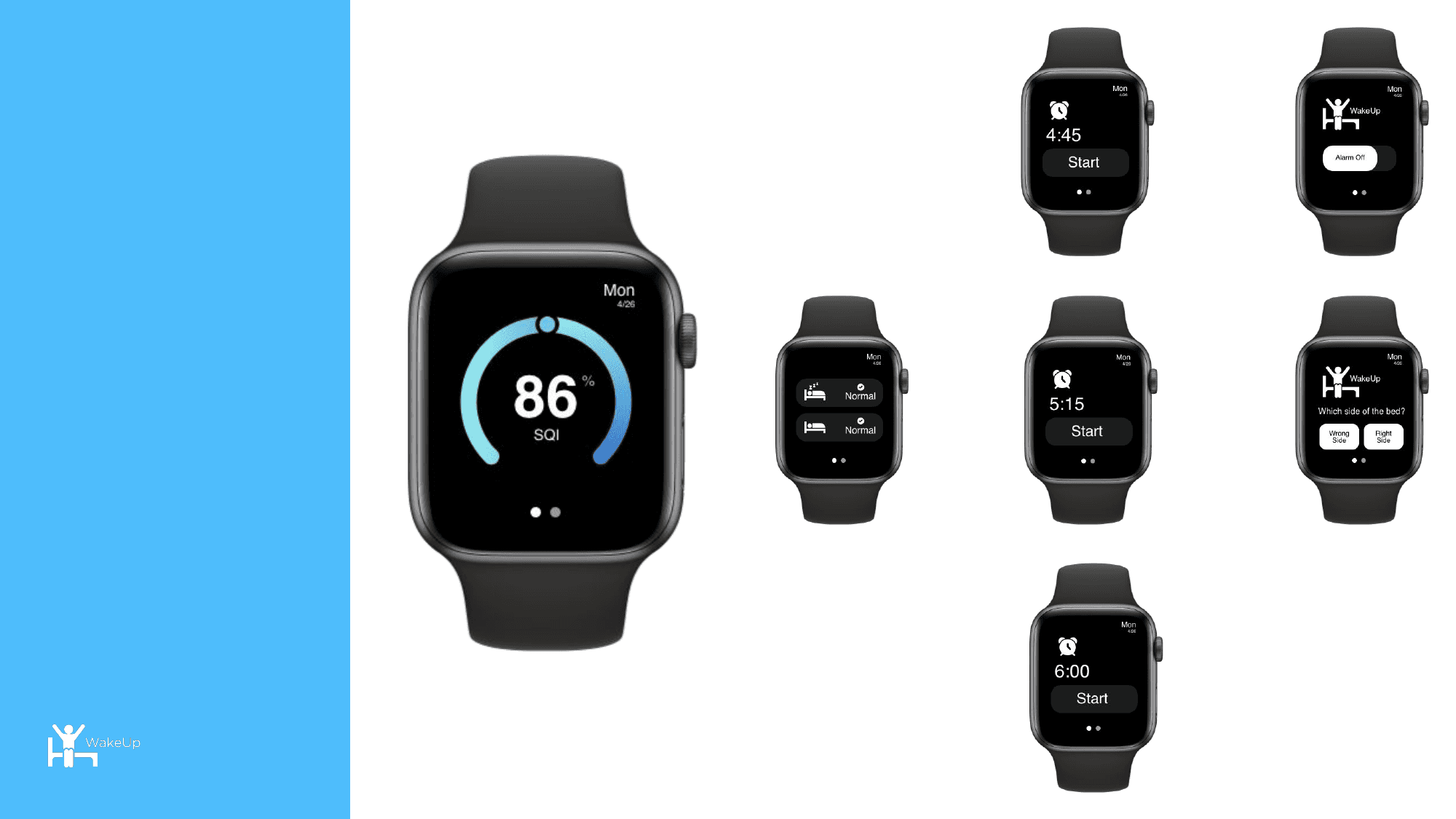
The SQI gauge anchors the morning summary screen: a user who scored 86% knows immediately they slept well. Below it, sleep stages appear as a timeline with BPM overlay, total time asleep, and time in bed. The hierarchy is strict: score first, stages second, recommendations third. No wall of metrics.
Feature 02
Smart Alarm with Mood Check-In
When the alarm fires, dismissing it triggers a two-option check-in: "Wrong side of the bed" or "Right side of the bed." Collected daily, this single data point builds a picture of whether the SQI score correlates with the user's subjective experience, letting WakeUp calibrate its alarm window for both objective and perceived quality over time.
Feature 03
Apple Watch: Glanceable at 44mm
The Watch interface strips everything to the essentials: SQI score, active sleep stage, and current BPM. During the day, the watch face complication shows yesterday's score and a trend indicator. Designing for the Watch forced discipline on the iPhone too: if a data point wasn't worth showing at 44mm, it probably didn't belong on the phone either.
Post-Launch Roadmap
The launch is a hypothesis, not a conclusion. The post-launch plan treats it as the start of a measurement loop: does the SQI correlate with how users feel? Do users in the "Right Side" bucket score higher than those in the "Wrong Side" bucket? These questions validate the core product bet.
Validation Testing
Compare SQI scores against mood check-in responses. Establish the correlation coefficient that proves the index is predictive, not just descriptive.
KPI Review
Daily active use rate, alarm engagement rate, and 7-day retention. A sleep app that users stop wearing the watch for has failed at the product level.
Analytics Instrumentation
Funnel the alarm window setup flow. Identify where users drop off or override the smart alarm. Dropoff is a signal that trust hasn't been earned.
Moderated User Testing
In-person sessions with participants who have worn the app for 14+ days. Focus on whether the SQI narrative feels accurate to lived experience, not just whether the UI is usable.
Unmoderated Testing
UsabilityHub task flows for alarm setup, morning review, and weekly trends. Optimize for time-to-first-insight in under 10 seconds.
Post-Launch Survey
Net Promoter Score and open-ended questions about trust. "Would you recommend WakeUp to someone who complains about waking up groggy?" is the exact question that validates the product's core promise.